Annotation Interface
The annotator view is designed for fast review and correction of model predictions.
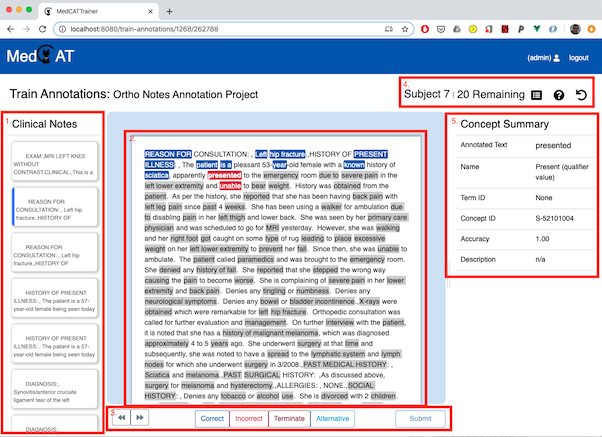
1) Document list
The left panel shows documents in the project dataset.
Current document is highlighted.
Prepared documents (model predictions generated) are marked.
Submitted/validated documents are marked as complete.
2) Clinical text
The center panel displays document text with detected concept spans.
Select spans by clicking them directly, then apply one status from the task bar.
Supported concept statuses
Correct
Incorrect
Terminate (if enabled for project)
Alternative (choose a different concept)
Irrelevant (if enabled for project)
Only one status can be active per concept at a time.
Adding missing annotations
If the model missed a mention:
Highlight text in the document.
Right-click and choose Add Term.
Search/select a concept in the concept picker.
Confirm to create the annotation.
Projects with add_new_entities enabled can also create brand-new concepts.
Overlapping annotations are supported.
3) Task bar and submission
The task bar contains status buttons and the Submit button.
Submit is enabled only when required tasks are completed for all concepts.
On submit, a confirmation dialog shows an annotation summary.
If project
train_model_on_submitis enabled, submitted annotations are used for incremental model updates (except remote model-service projects).
4) Header actions
Top-right actions:
Summary: open document annotation summary.
Help: keyboard shortcuts and project guidance.
Reset document: re-prepare current document and clear document-level annotation state.
Meta annotations and relations
Depending on project configuration:
Meta Annotation Tasks appear for relevant concept statuses.
Relation tab appears to create/edit relations between annotated entities.
Keyboard shortcuts
Shortcut |
Action |
|---|---|
Up / Down |
Previous / next document |
Left / Right (or Space) |
Previous / next concept |
|
Correct |
|
Incorrect |
|
Terminate (if enabled) |
|
Alternative |
|
Irrelevant (if enabled) |
Enter |
Submit / confirm submit |
Esc |
Close active modal/cancel active add-term flow |